Playbook Components
Enterprise edition
Playbook automation is available under the "OpenCTI Enterprise Edition" license. Read the dedicated page for full details.
OpenCTI playbooks are flexible automation scenarios that you can fully customize and activate to enrich, filter, and modify data created or updated in the platform. This page details the available components and how to use them, these are split into the following groups:
- Start Playbook
- Transform and Enrich
- Share and Access
- End Playbook
Start playbook components
These components provide the event source or trigger criteria that control when your playbook will run.
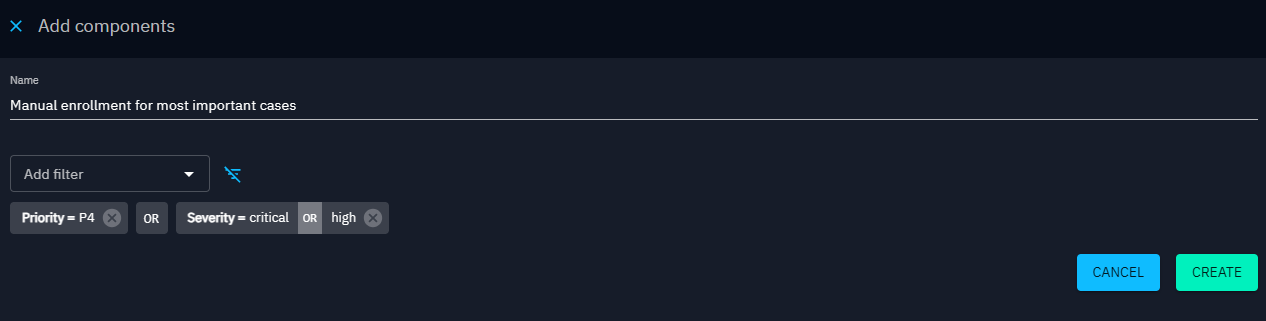
Available for manual enrollment
Use this event source to create a playbook that you trigger manually on specific entities. You can configure filters in the component so that the playbook appears as a suggestion only for entities that match the filter criteria.
Listen knowledge events
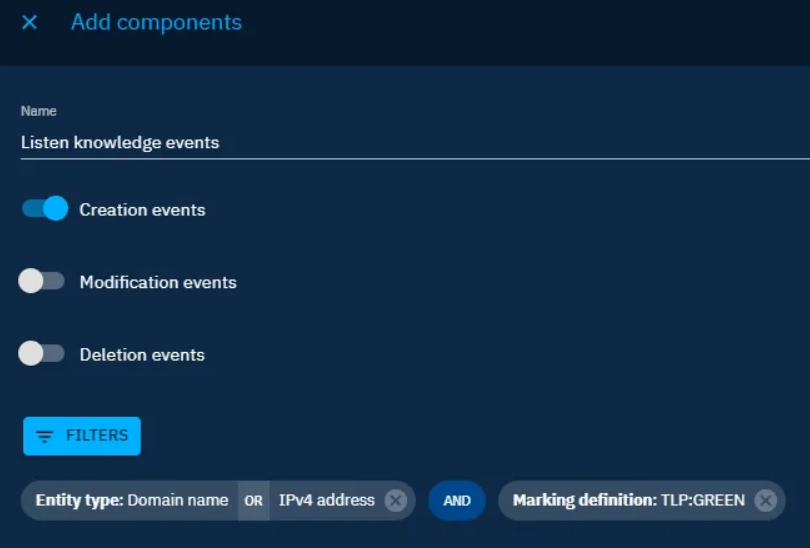
With this event source, the playbook triggers on any knowledge event (create, update, or delete) that matches the selected filters. You can use only the subset of filters available for stream events that contain STIX data objects.
- Use ‘create’ events when you want to trigger the playbook on the creation of a new entity or relationship within the platform. For example to automatically enrich a new Indicator.
- Use ‘update’ events when you want to trigger the playbook when the entity or relationship is modified. For example this can be used when a specific label is added to trigger automatic actions such as enrichment or add to new container.
- Use ‘delete’ events when you want to trigger the playbook when an entity or relationship is removed from OpenCTI. For example you can use this to notify a user when an entity they created is deleted or to trigger a data review if a relationship is deleted.
To make this playbook available for manual enrollment, activate the Available for manual enrollment toggle. The playbook then appears as an option when you select an entity that matches the event source filter criteria. Deactivate this toggle to hide the playbook from manual enrollment.
Component details
As this component listens to the stream of events from knowledge it is able to be triggered with two additional conditions, 'has changed' and 'has not changed'. This operator can be applied when adding any property filter and will match if the property has been changed (or has not changed). This allows you to listen for temporal event changes on an entity such as when the status or score property has changed or when a vulnerability has been flagged as part of the CISA Known Exploited Vulnerabilities catalogue. These trigger conditions are particularly useful in combination with dynamic notifications or emails that can notify users when a case they are participating in has the status changed or similar actions.
Listen PIR events
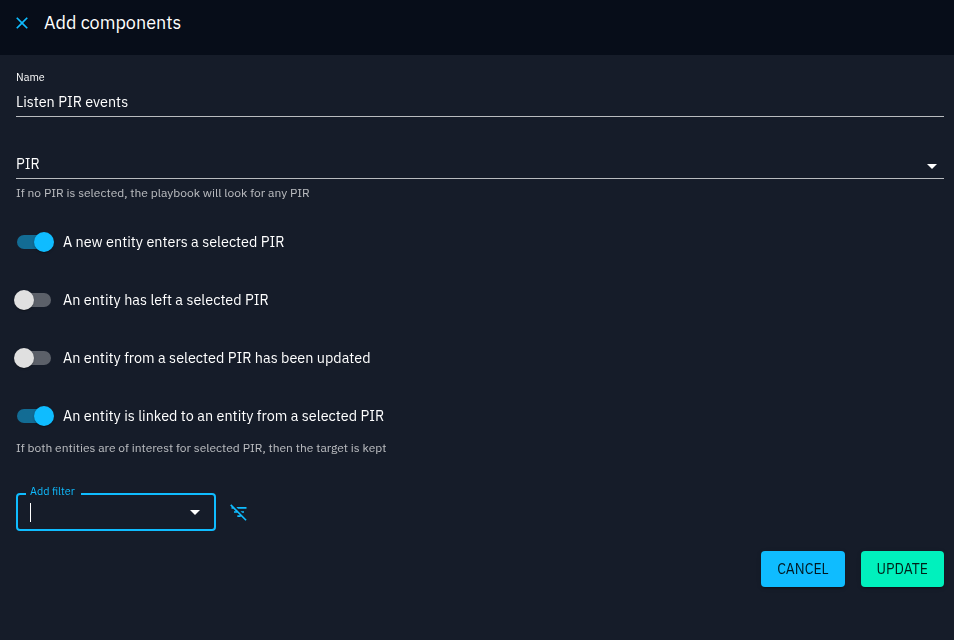
This event source listens to Priority Intelligence Requirement (PIR) events. You select the PIRs to monitor and choose the cases in which the playbook triggers by using the corresponding toggles:
- A new entity becomes part of a selected PIR
- An entity is no longer part of a selected PIR
- An entity from a selected PIR is updated
- An entity is linked to another entity that is part of a selected PIR
Note: By default, if no PIR is selected, all available PIR events will be processed by the playbook.
Component details
The filter allows you to monitor events only for entities that meet the filter criteria, for example you can set a PIR score so that the playbook is triggered when an entity in your PIR is added with a high PIR score. Additionally as this component listens to the stream of events from knowledge it can be triggered with two specific conditions, 'has changed' and 'has not changed'. This operator can be applied when adding any property filter and will match if the property has been changed (or has not changed). This allows you to listen for specific property changes for an entity that is part of the PIR.
Query knowledge on a regular basis
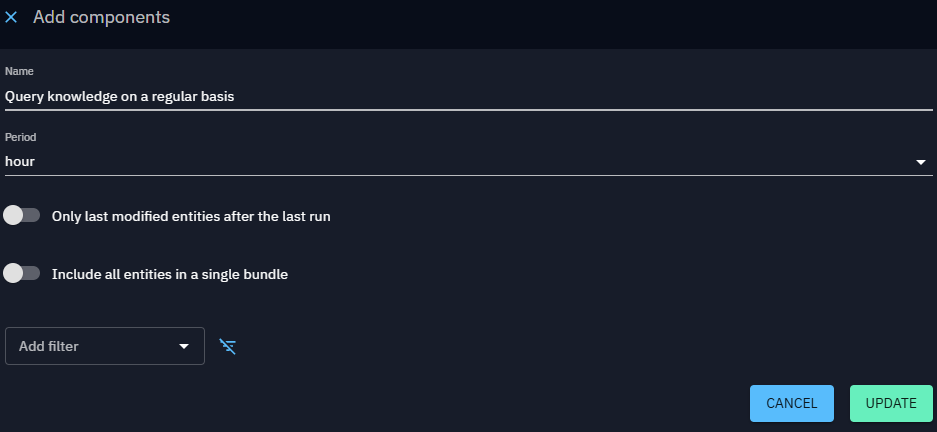
With this event source, the playbook queries knowledge on an hourly, daily, weekly, or monthly basis, according to the filters you configure.
If you activate the Only last modified entities after the last run option, the playbook excludes entities that have not changed since the previous run.
Component-specific options Include all entities in a single bundle: This option adds all matching entities to a single bundle. For example use this when you want to send a single notification (for example, one email) that contains multiple entities.
Transform and enrich components
These components define how the bundle is filtered, enriched and updated by the playbook.
Apply predefined rule
This component applies a built-in automation rule. These rules may affect performance. The available rules are:
- First/Last seen computing extension from report publication date: Populates the first seen and last seen dates of entities in the report based on its publication date.
- Resolve indicators based on observables (add in bundle): Retrieves all indicators linked to the bundle's observables from the database.
- Resolve observables an indicator is based on (add in bundle): Retrieves all observables linked to the bundle's indicators from the database.
- Resolve container references (add in bundle): Adds all relationships and entities that the container contains to the bundle. If the triggering entity is not a container, this component produces an empty output.
- Resolve neighbors relations and entities (add in bundle): Adds all relations of the triggering entity and all entities at the end of those relations (the "first neighbors") to the bundle. If the triggering entity is a container, this component produces an empty output.
- Resolve containers containing the entity (add in bundle): Adds all containers that contain the triggering entity or observable to the bundle.
Component details
You cannot chain two rules
You cannot apply a second rule to the result of the first rule within the same playbook. For example, listening to a report creation, resolving container references, and then resolving neighbor relations does not work. The playbook stops at the second rule.
Routes: - Out: If at least one entity or observable in the STIX bundle was affected by the rule, the bundle follows the Out route. - Unmodified: If no entities or observables in the STIX bundle were affected by the rule, the bundle follows the Unmodified route.
Container wrapper
This component modifies the received STIX 2.1 bundle to include the entities in a container of the type you configure.
Scope controls
Choose to apply this component to:
- All elements in the bundle [default]
- Main element in the bundle
- All except the main element in the bundle
Add filters to control which elements in your bundle the action defined in the component is applied to.
Component details Case templates
You can add a case template to the Container wrapper step. If you select a case in the Container type field, the Case template field becomes available. This allows you to create a case with associated tasks.
- Create a new container at each run
You can choose whether to create a new container each time this step runs. By default, this option is disabled, so the playbook consolidates information in the same container when updates occur.
- Wrap an incident into a case
When the primary entity is an incident and you use the Container wrapper step to create a case, the case reuses the following attributes from the incident by default:
- Author
- Labels
- Assignee
- Participant
- Title
- Marking
- Severity (only if the severity value of the incident exists as a severity value for the case type — verify this in the Taxonomy settings)
Create security coverage
Will create a new security coverage for the entities (with compatible types) contained in the received STIX 2.1 bundle and send out the modified bundle. The bundle will contain the initial entities plus the created security coverages.
Scope controls
Choose to apply this component to:
- All elements in the bundle
- Main element in the bundle [default]
- All except the main element in the bundle
Add filters to control which elements in your bundle the action defined in the component is applied to.
Enrich through connector
This component sends the received STIX 2.1 bundle to the specified enrichment connector and outputs the modified bundle.
Component details - The step fails if any entity does not match the connector scope
All entities passed to this component must be compatible with the enrichment connector. If an incompatible entity reaches this step, the playbook stops.
To avoid this, use a first playbook to flag your data by applying a specific label through the Manipulate knowledge component. Then create a second playbook that listens for entities or observables created or edited with that label and routes them to the correct enrichment connector through a decision tree. You can also use the Reduce Knowledge component to filter out incompatible entities before this step.
- The step fails if the enrichment source does not find the observable
If the playbook stops intermittently at this step, the third-party enrichment system may not have a record for the observable (or entity).
Extract observables from indicator
This component extracts observables based on indicators in the received STIX 2.1 bundle.
Scope controls
Choose to apply this component to:
- All elements in the bundle
- Main element in the bundle [default]
- All except the main element in the bundle
Add filters to control which elements in your bundle the action defined in the component is applied to.
Component details
You can also add all observables and relationships generated by this component to the triggering entity, if that entity is a container.
Routes: - Out: If at least one indicator triggered an observable creation, the bundle follows the Out route. - Unmodified: If no indicators triggered an observable creation, the bundle follows the Unmodified route.
Log data in standard output
This component writes the received STIX 2.1 bundle to the platform logs at a configurable log level. It then passes the STIX 2.1 bundle unmodified to the next component.
Manipulate knowledge
This component adds, replaces, or removes compatible attributes of the entities in the received STIX 2.1 bundle and outputs the modified bundle.
Scope controls
Choose to apply this component to:
- All elements in the bundle [default]
- Main element in the bundle
- All except the main element in the bundle
Add filters to control which elements in your bundle the action defined in the component is applied to.
Component details
- An add operation appends the specified values to the existing set in the platform.
- A replace operation overwrites the existing set with the specified values
- A remove operation deletes the specified values from the existing set.
When a Manipulate Knowledge step is followed by an enrichment connector in the same playbook, explicit operations from the enrichment connector are automatically preserved and carried through into the enrichment step's output. This means that when the final result is written to the platform, both the enrichment data and the manipulation operations are reconciled correctly — for example, a label added by an enrichment connector and a label removed by Manipulate Knowledge will both take effect as expected in the final write to knowledge.
Routes: - Out: If at least one entity or observable in the STIX bundle was modified, the bundle follows the Out route. - Unmodified: If no entities in the STIX bundle were modified, the bundle follows the Unmodified route.
Match knowledge
This component allows the playbook to continue only if the data matches the filter criteria set.
Component details Routes: - Out: If at least one entity or observable in the bundle passes the matching condition, the bundle follows the Out route. - No-match: If no entity or observable in the bundle passes the matching condition, the bundle follows the No-match route.
Promote observable to indicator
This component generates indicators based on observables in the received STIX 2.1 bundle.
Scope controls
Choose to apply this component to:
- All elements in the bundle
- Main element in the bundle [default]
- All except the main element in the bundle
Add filters to control which elements in your bundle the action defined in the component is applied to.
Component details
You can add all indicators and relationships generated by this component to the triggering entity, if that entity is a container.
Routes: - Out: If at least one observable triggered an indicator creation, the bundle follows the Out route. - Unmodified: If no observables triggered an indicator creation, the bundle follows the Unmodified route.
Reduce knowledge
This component removes entities in the current STIX bundle based on the criteria set, keeping only those that match the defined filter conditions.
The main element is always preserved
The entity that originally triggered the playbook (for example, a report) is never removed from the bundle, even if it does not match the filter. This ensures the playbook can still be processed correctly.
Component details
At any point in a playbook, the STIX bundle may contain multiple entities — for example, after a Resolve container references (add in bundle) step. Reduce knowledge keeps only the entities that match your filter criteria. The main entity is never removed.
As the main element is always preserved, subsequent components that update your data such as "Manipulate knowledge" can be set to "all except main element in the bundle".
Routes: - Out: The bundle now contains only the main entity and the entities that matched the filter. The playbook continues down this route. - Unmatched: No entity in the bundle matched the filter conditions. The original bundle passes through unchanged. The playbook continues down this route.
Share and access components
These components manage the access permissions and allow you to share the bundle with organizations.
Manage access restrictions
This component applies authorized member restrictions to STIX containers or organization entities in the bundle. To apply access controls to other entities please consider using the share with organizations component.
Scope controls
Choose to apply this component to:
- All elements in the bundle
- Main element in the bundle [default]
- All except the main element in the bundle
Add filters to control which containers or organization elements in your bundle the action defined in the component is applied to.
For more details, see Authorized members and Containers.
Component details
Direct database query
This component makes a direct query to the database before the Send for ingestion step. If you create a new entity (for example, with the Container wrapper step) and apply authorized members in the same playbook, the playbook fails because the entity does not yet exist. To avoid this, run apply authorized members in a separate playbook.
Dynamic variables
This component supports dynamic variables:
-
Dynamic from the triggering entity: Applies authorized members based on a field of the triggering entity only. You can choose from:
-
Author (organization): If the author is an organization, applies authorized members to that organization.
-
Creator: Applies authorized members to all users in the Creator field.
-
Assignee: Applies authorized members to all users in the Assignee field.
-
Participant: Applies authorized members to all users in the Participant field.
-
Dynamic from the bundle: Applies authorized members based on all entities in the bundle, not only the triggering entity.
-
Organization: All users belonging to the organization entities in the bundle are added as authorized members.
-
Static fields
This component also supports static fields for authorized members: users, groups, and organizations.
Remove access restrictions
This component removes authorized members from the container and organization entities in the bundle. To remove access to other entities or relationships please consider using the unshare with organizations component.
Scope controls
Choose to apply this component to:
- All elements in the bundle
- Main element in the bundle [default]
- All except the main element in the bundle
Add filters to control which elements in your bundle the action defined in the component is applied to.
Share with organizations
This component shares the specified entities in the received STIX 2.1 bundle with the organizations you configure. Your platform must have a main organization declared in Settings > Parameters.
Scope controls
Choose to apply this component to:
- All elements in the bundle
- Main element in the bundle [default]
- All except the main element in the bundle
Add filters to control which elements in your bundle the action defined in the component is applied to.
Direct database query
This component makes a direct query to the database before the Send for ingestion step. If you create a new entity (for example, with the Container wrapper step) and share it in the same playbook, the playbook fails because the entity does not yet exist. To avoid this, run share the entity in a separate playbook.
For more details, see Organization segregation.
Transform with AI
This component sends the bundle to the configured AI agent. By default, it uses the "CTI STIX transformer" agent, which is configured to only use the STIX 2.1 data schema and returns a STIX bundle that can then be further processed by the playbook.
Use Additional user instructions to provide the agent with a prompt to follow, and choose the user the agent should run as so that it only has access to the data it needs. For security reasons, the Run as selection is limited to yourself (the user editing the playbook) and service accounts.
This component requires access to the XTM One platform and will consume usage of your XTM One quota.
Unshare with organizations
This component removes sharing for the configured entities in the received STIX 2.1 bundle from the organizations you set. Your platform must have a main organization declared in Settings > Parameters. To avoid conflicts between playbook components, apply the Unshare with Organisations step before any Share with Organisation steps — or, handle unsharing in a separate playbook altogether.
Scope controls
Choose to apply this component to:
- All elements in the bundle
- Main element in the bundle [default]
- All except the main element in the bundle
Add filters to control which elements in your bundle the action defined in the component is applied to.
Direct database query
This component makes a direct query to the database before the Send for ingestion step. If you create a new entity (for example, with the Container wrapper step) and unshare it in the same playbook, the playbook fails because the entity does not yet exist. To avoid this, run unshare the entity in a separate playbook.
End playbook components
These components end the playbook or branch.
Send email from template
This component sends an email using a template configured in Settings > Security (used for user notifications). You can select the template to use and choose to set the email targets either dynamically, based on the data processed or set to a static user, group or organization, see below for more details.
Component details
Dynamic targets
This component supports dynamic targets on the field selected and then based on the entities set in the 'Resolve dynamic targets from'.
Dynamic from context Sends the email to the corresponding user of the field you choose, based on the entity specified in the bundle scope. You can choose the email targets from:
-
Creator: Sends an email using the selected template to the user(s) listed as creator(s) on the entity.
-
Assignee: Sends an email using the selected template to the user(s) listed as assignee(s) on the entity.
-
Participant: Sends an email using the selected template to the user(s) listed as participant(s) on the entity.
Dynamic from organizations present in the bundle Sends the email to the corresponding users of the organization entities in the bundle.
Static fields
This component also supports static fields for recipients: users, groups, and organizations.
Send for ingestion
This component passes the STIX 2.1 bundle to the data stream for writing. It has no output and should be the final component in a branch of your playbook.
Send to AI
This component passes the STIX 2.1 bundle to the AI agent, by default this will be set to the CTI STIX Consumer. Configure this component with the additional user provided instructions that will act as the user prompt and set the user account that the agent will run as to ensure it has the correct access permissions. For security reasons, the Run as selection is limited to yourself (the user editing the playbook) and service accounts. Once the data is processed the playbook will complete and the bundle will continue to be processed by the AI agent depending on instructions. For example the instructions may specify the creation of a new weekly grouping of data to be created in OpenCTI, the AI agent would then create the new grouping in the Draft space within OpenCTI where an analyst can review the AI agent's output.
Send to notifier
This component generates a notification each time it receives a STIX 2.1 bundle. The Send to notifier component ends a branch but does not save any changes. You can select the notifier to be used and set the notification targets either dynamically, based on the data processed or set to a static user, group or organization, see below for more details.
Component details Dynamic variables This component supports dynamic targets on the field selected and then based on the entities set in the 'Resolve dynamic targets from'.
Dynamic from context Sends the notification to the corresponding user of the field you choose, based on the entity specified in the bundle scope. You can choose the notifier targets from:
-
Creator: Sends a notification using the selected notifier to the user(s) listed as creator(s) on the entity.
-
Assignee: Sends a notification using the selected notifier to the user(s) listed as assignee(s) on the entity.
-
Participant: Sends a notification using the selected notifier to the user(s) listed as participant(s) on the entity.
Dynamic from organizations present in the bundle: Sends the notification to the corresponding users of all organization entities in the bundle.
Static fields
This component also supports static fields for recipients: users, groups, and organizations.
To save changes, create a branch next to the notifier by clicking the arrow icon in the bottom-right corner of the component, and add a Send for ingestion component in that branch.